The information below outlines the sexual misconduct statement (SMS) and background check (BGC) flow in the Workday Recruit process.
To review the full recruitment process for Faculty, go to the Faculty Recruitment Toolkit home page.
Workflow
Open a panel below for details.
The Workday action notifies your HR Service Team to initiate the SMS process.
The application must be assigned to a job requisition (not an evergreen requisition) to initiate the “Background Check” or “Request to Offer” actions in Workday.
Depending on the candidates’ employment history, the Sexual Misconduct Statement (SMS) process may take up to 3 to 5 business days. The SMS process is completed outside of Workday.
The SMS process is in compliance with Washington State law. Refer to RCW 28B.112.080, Sexual Misconduct – Offers of Employment – Requirements. For more information, visit the Sexual Misconduct Statement Guideline page.
Once HR Service team approves the action, Workday will send an inbox “To-do” task to the HR Partner and Primary Recruiter with instructions for making and documenting a verbal offer.
WSU requires all offers to be approved by an Appointing Authority. Review university policy Recruitment and Selection of Faculty Personnel (UPPM 60.11) for more information.
Verbal offer must contain the following information:
- Offer is contingent upon successful background check (if the recruitment requires a background check)
- Position title offered
- Faculty status offered
- Salary offered – not to exceed posted salary on job requisition
- Tentative start date
- Other employment conditions (relocation, startup, hiring incentives, etc.)
Candidates may engage in negotiations during the verbal offer process.
Hiring department must provide the candidate written confirmation of verbal offer using the Working applicant message template titled “Verbal Offer Contingent on Successful BGC.”
The HR Partner or Recruiter will select the final candidate in Workday, click the “send” button and select the “Verbal Offer Contingent on Successful BGC” message template. The HR Partner or Recruiter will need to edit the relevant sections of the message template before sending the Workday message to the candidate.
Candidates may engage in negotiations after receiving the verbal offer confirmation message. Once verbal offer is extended, their Workday applicant status can move to “Background Check” action.
Go to the Background Checks page to review available background check packages and the base prices. Background package choice is submitted through the Workday process. Contact your HR Service Team for questions or advice.
Refer to WSU UPPM 60.16. for background check policy.
Depending on candidates’ promptness in providing personal information to our third-party vendor, a standard Background Check may take up to 3 to 5 business days; add-ons may take up to 10 business days.
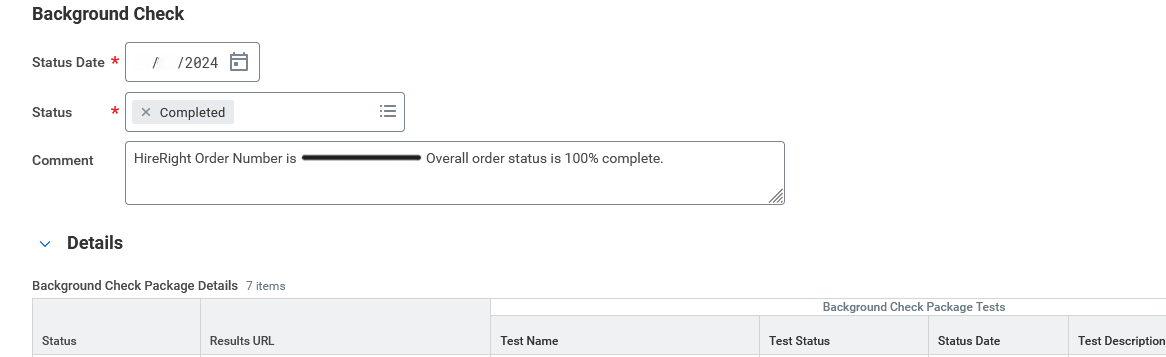
Once completed, the HR Service Team will review the background check results. If background check requires consultation with the department, HR Consultant will follow up with the Appointing Authority. If satisfactory, your HR Service Team will approve “Background Check” action in Workday. This will move candidates’ status forward in Workday.
The background check status listed as “Completed” in Workday does not mean the Background Check results review is completed. For example:
Before moving forward with the offer letter or employment agreement, ensure the application status in Workday is listed as “Offer.”
Offer Letter templates are available in the Letters and Forms section. Submit official offer letter to be reviewed and approved by the Appointing Authority and HR Service Team. After approvals, the official offer letter can be sent via email or mail, depending on candidate preference.
If candidate wishes to renegotiate offer terms, HR Partner will move candidate Workday status to “Renegotiate Offer”.
Submit the employment agreement to be reviewed and approved by the Appointing Authority and HR Service Team.
Once the candidate is moved to Ready for Hire, the HR Partner receives the Workday My Tasks to initiate the Hire for external candidates or Change Job or Add Additional Job for internal candidates.
Review these Workday reference guides for step-by-step instructions:
Once the candidate is moved to Ready for Hire, the HR Partner receives the Workday My Tasks to initiate the Hire for external candidates or Change Job or Add Additional Job for internal candidates.
Review these Workday reference guides for step-by-step instructions:
- Hire Employee for external candidates
- Change Job or Add Additional Job for internal candidates
Contact your HR Service Team if you have any questions or concerns during this process.
Contact Talent Acquisition
We’re here to help you through the recruiting process.

Quick Links
Return to the Recruitment Toolkit section page, or open the panel below for more pages.
- Understanding Work Authorization Questions & Responses
- Background Check & Sexual Misconduct Statement Workflow for Staff
- Background Check & Sexual Misconduct Statement Workflow for Faculty
- WSU’s Introduce Yourself Program FAQs
- Sexual Misconduct Statement Guidelines & Process
- Hiring Incentive and Employee Referral Program
- Staff Recruitment Toolkit
- Equal Pay and Opportunities Act FAQs
- Total Compensation for WSU Faculty and Staff
- Application Instructions for Prospective Employees
- Candidate Guest Guidelines During On-campus Interviews
- Search Committee Training
- Connect With Us!
- Leadership Recruitment Toolkit
- Veterans
- Staff Outreach & Advertising
- Faculty Outreach and Advertising Information
- Background Checks
- Relocation Information
- Recruitment Outreach Tools
- Faculty Recruitment Toolkit
- Candidate Experience
- Temporary & Hourly Recruitment Toolkit