FACULTY
Workday BGC & SMS Workflow Guide
FACULTY
Below does not reflect the full recruitment process. It outlines the sexual misconduct statement (SMS) and background check (BGC) process in Workday Recruit. For more information, please click the drop down at each step.
STEP 1: HR Partner submits “SMS Process” action in Workday.
The Workday action notifies your HR Service Team to initiate the SMS process.
*The application must be assigned to a job requisition (not an evergreen requisition) to initiate the “Background Check” or “Request to Offer” actions in Workday.
STEP 2: HR Service Team initiates the SMS process.
Depending on the candidates’ employment history, the SMS process may take up to 3 to 5 business days. SMS process is completed outside of Workday.
*The SMS process is in compliance with Washington State law. Refer to RCW 28B.112.080, Sexual Misconduct – Offers of Employment – Requirements. For more information, visit HRS Sexual Misconduct Statement Guideline.
Step 3: When SMS is complete, HR Service Team will approve “SMS Process” action in Workday. Hiring department receives the verbal offer task in Workday.
Once HR Service team approves the action, Workday will send an inbox “To-do” task to the HR Partner and Primary Recruiter with instructions for making and documenting a verbal offer.
STEP 4: Hiring department makes verbal offer.
WSU BPPM 60.11 requires all offers to be approved by an Appointing Authority.
Verbal offer must contain the following information:
- Offer is contingent upon successful background check (if the recruitment requires a background check).
- Position title offered.
- Faculty status offered.
- Salary offered – not to exceed posted salary on job requisition.
- Tentative start date.
- Other employment conditions (relocation, startup, hiring incentives, etc.)
NOTE: Candidates may engage in negotiations during the verbal offer process.
STEP 5: HR Partner/ Recruiter sends the final candidate the verbal offer confirmation message through Workday.
Hiring department must provide the candidate written confirmation of verbal offer using the Working applicant message template titled: Verbal Offer Contingent on Successful BGC.
The HR Partner or Recruiter will select the final candidate in Workday, click the “send” button and select the “Verbal Offer Contingent on Successful BGC” message template. The HR Partner or Recruiter will need to edit the relevant sections of the message template before sending the Workday message to the candidate.
NOTE: Candidates may engage in negotiations after receiving the verbal offer confirmation message. Once verbal offer is extended, their Workday applicant status can move to “Background Check” action.
STEP 6: HR Partner selects BGC package & submits “Background Check” action in Workday (if applicable).
Please visit Background Checks to review available background check packages and the base prices. Background package choice is submitted through the Workday process. Contact your HR Service Team for BGC questions or advice.
*Refer to WSU BPPM 60.16. for background check policy.
STEP 7: HR Service Team initiates background check (if applicable).
Depending on candidates’ promptness in providing personal information to our third-party vendor, a standard BGC may take up to 3 to 5 business days; add-ons may take up to 10 business days.
STEP 8: HR Service Team provides BGC results to hiring department (if applicable).
Once completed, the HR Service Team will review the background check results. If background check requires consultation with the department, HR Consultant will follow up with the Appointing Authority. If satisfactory, your HR Service Team will approve “Background Check” action in Workday. This will move candidates’ status forward in Workday.
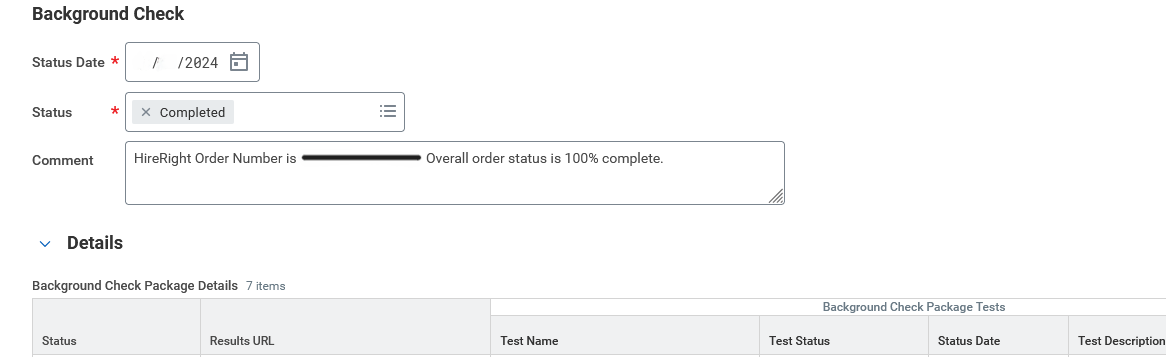
NOTE: The background check status listed as “completed” does not mean the BGC results review is completed. For example:
Before moving forward with the offer letter or employment agreement, ensure the application status in Workday is listed as “Offer.” For example:
STEP 9: Hiring department moves candidate status to “Confirm Offer” and prepares official offer letter outside Workday.
Offer Letter templates are available on the HRS website. Submit official offer letter to be reviewed and approved by the Appointing Authority and HR Service Team. After approvals, the official offer letter can be sent via email or mail, depending on candidate preference.
NOTE: If candidate wishes to renegotiate offer terms, HR Partner will move candidate Workday status to “Renegotiate Offer”.
STEP 10: HR Partner initiates the employment agreement in Workday.
Submit the employment agreement to be reviewed and approved by the Appointing Authority and HR Service Team.
STEP 11: When candidate accepts official offer, HR Partner can move the candidate to “Ready for Hire” to begin the Hire process in Workday.
Once the candidate is moved to Ready for Hire, the HR Partner receives the My Tasks to initiate the Hire for external candidates or Change Job or Add Additional Job for internal candidates.
Contact your HR Service Team if you have any questions or concerns during this process.